
EML to PST Converter for Mac – Finely Tuned Application That Works Consistently to Migrate Your Email Data!
EML to PST Converter tools are essential when you’re switching to Microsoft Outlook and need to bring your existing emails along. Whether you’re a home user with archived .eml files or an IT professional managing large-scale migrations, finding a reliable solution is key. That’s where Mail Extractor Pro comes in—a powerful, user-friendly tool designed to convert EML files to PST format with speed, accuracy, and zero data loss. With support for multiple email clients and a clean interface, it’s the ultimate solution for anyone looking to simplify email conversion.
EML to PST Converter for Mac
Mail Extractor Pro is not only an EML to PST Converter for Mac, but also It can convert Apple Mail, Thunderbird, Postbox and MBOX to PST for Mac and Windows Outlook.
‘Mail Extractor Pro’ is a product of care and attention to detail to solve the email migration problem once and for all. It can convert Apple Mail, Thunderbird, and Postbox database directly by auto-loading Profiles, but it is also a popular MBOX and EML to PST converter. Rich in useful features unified with a friendly interface – ‘Mail Extractor Pro’ is the software application of near perfection and does it job marvelously.
In short, it is exact, and the only app, needed for moving email data from several Mac OS X email clients to PST format of Windows Outlook, which is also compatible with Mac Outlook version.
Here are the key features:
- Simple/Quick Installation without any additional requirements
- MBOX and EML to PST converter
- Auto-loading databases of Apple Mail, Thunderbird, and Postbox
- Basic graphical interface for home, non-experienced users
- Advanced features for complicated and large-scale migration tasks
- Multi-licensing options for both home and IT users
- 24 x 7 technical support of USL Software
Autoloading
Forget manually loading any files. The tool can autoload Profiles of Thunderbird, Postbox, and Apple Mail without you having to fiddle with anything.
MBOX and EML
Apart from autoloading mechanism, you can also convert standard MBOX and EML files to PST in no time. Even batch conversion support for multiple users is supported.
Simple
Graphic user-interface is designed to perfection to bring all of it together and give the basic users with no experience the equal chance to migrate efficiently and safely.
Detailed
Email data contains metadata, attachments, links, email addresses, images, and more. It has smart processing logic that takes care of all the information and elements.
Retains Structure
Folders are crucial for data management. Thankfully, this tool manages to retain the entire structure and does not let the hierarchy crumble.
Non-English content
Do you have text, links, email addresses, and other parts in languages other than English? ‘Mail Extractor Pro’ brings native support for conversion of Unicode content.
Refined, Bug-Free
Bugs, errors, and glitches are annoying. It is a refined and fully optimized application that will run without a single instance of any such annoyance.
Much Faster
Care about productivity? Now convert EML to PST or migrate other types of data in no time. The app runs with much faster speed than previously established for migration tools.
How to use it?
As mentioned above once, it has a simple interface that will make even the first-time users migrating the data feel like experts. Its intuitive nature works on its own to give you a seamless experience. The steps outlined below on how to use it for migrating your data will show how simple it can be.
- Step :1 Launch “Mail Extractor Pro” after the installation is finished and click on “Load” next to the input source you want to convert, like Apple Mail, Thunderbird, Postbox, MBOX, or EML
- Step :2 If you select other than MBOX and EML, you will get another two options to choose from:
- Sub-Step: 1. Auto-load: this automatically picks up the Profiles and gets all the data from the main database location ready for conversion
- Sub-Step: 2. Open: This is the same as above, except you can pick any other backup or exported folders/profiles from locations such as external disk.
- Step :3 If ‘Auto-load’ is not chosen, browse to the location of your database or MBOX or EML files and select them.
- Step :4 Choose folders you want to convert. Simply ‘tick’ the checkboxes. Un-check the folders that do not need migrating to PST/Outlook.
- Step :5 Select maximum PST file size and ‘Mail Extractor Pro’ will split them into smaller files, in case they cross the size limit.
- Step :6 Click “Convert” and then just wait for the tool to do its magic. In no time, you will have clean, accurate, and controlled-size PST files that you can use with Windows and Mac Outlook both.
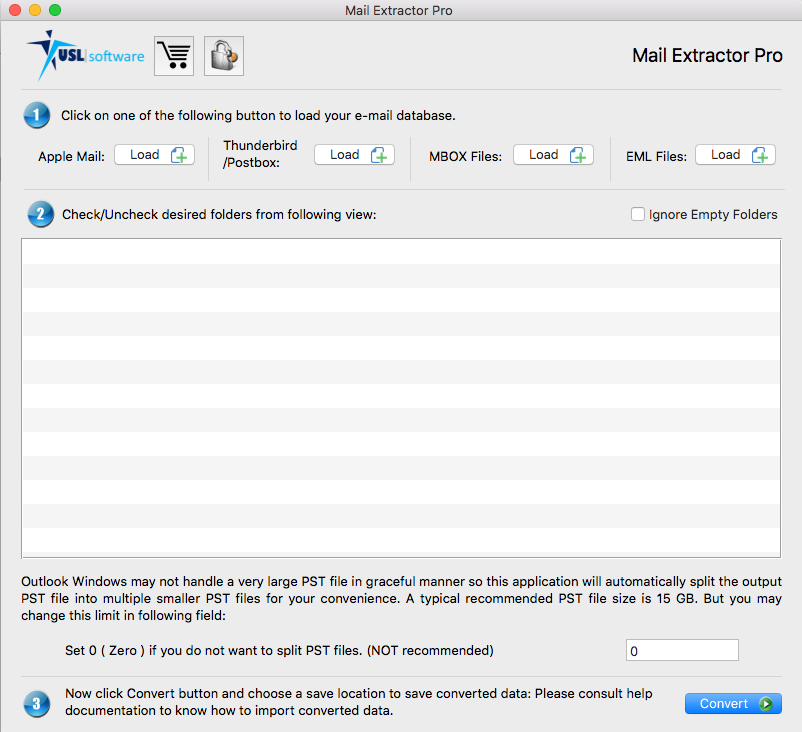
EML to PST Converter (Features in Detail)
Let’s go into some depth of its features and how they can radically transform the experience of email migration, something that is often very daunting to most.
Let the tool Autoload the Profiles
A Profile in email application is the set of settings, data, and security credentials and all of it is stored inside the database folder somewhere locally in your computer. By default, it is always inside the users’ library folders. For Thunderbird, it is inside ‘AppData’ folder. By offering the smart auto-loading mechanism, you have bene released from messing around with the raw data files manually. Now it’s possibly to simply click once on the ‘Auto-load’ and you will find that all the data from the chosen Profile is ready for conversion automatically. Another sub-feature of this mechanism is where you can specify the location of the exported or backed up Profile databases. It works similarly to autoloading option, as in, you do not need to handle the files yourself, just specify the location where it is stored, for example, in an external hard disk or drive.


Simple Interface Made Functional
If there is no interaction possible with the software, all of it is futile anyway. With a proper and friendly interface, there is a bridge between advanced software mechanisms and all of its power with the human users. “Mail Extractor Pro” UI is designed specifically to bridge this gap most effectively. It is not only simple and intuitive but also highly functional, giving you a lot of control and power without overwhelming you.
Accuracy Taken to Whole Another Level
Email migration can often be like language translation, where a few things always are either converted to something new or is missed entirely. With generic EML to PST converters or Apple Mail to PST converters, there is a likelihood of missing parts of your database like images, attachments, formatting to the text, links, and metadata. The central engine of “Mail Extractor Pro” that powers the conversion is developed cautiously and smartly to offer you 100% conversion without any exception. It takes into account everything, from the smallest detail to the biggest file. One very common complaint while migrating email databases is the loss of folder hierarchy, which is a thing of past now with ‘Mail Extractor Pro.’ You will find everything converted with its original structure and metadata intact.


Native conversion algorithms for Unicode content
The application has at its core a natively supported algorithms that process the content of all the languages. It works perfectly with the Unicode text, which is the Universally accepted standard for text encoding in most of the languages the world uses. It also includes many special characters. This not only applies to the text of the emails, but also to other kinds of elements like links, email addresses, and information in headers (to, from, subject, etc.).
Technical Support 24 x 7
Even though, the interface makes the requirement for any skills or experience useless, there are times when certain large migration projects would be far more efficient with the help of an experts-based support team. And that’s exactly what USL Software backed 24 x 7 technical support is. There is email based, chat-based and even TeamViewer based support models that you can take full advantage of, in case you need help. They are quick to respond and always offers full satisfaction with the resolution.

You can Get a Free Copy of “Mail Extractor Pro” Right No Strings Attached
A free copy of ‘Mail Extractor Pro’ can be downloaded below. It works on ten emails per folder and has access to every other feature that you want to see working in detail. It gives you an opportunity to find out for yourself how effective and intuitive the application is for your specific database. Convert EML to PST, or MBOX to PST, or choose to convert Apple Mail, Thunderbird, and Postbox database to PST files using its amazing Auto-load feature.
For Unlocking the full version to convert unlimited emails, get one of the licenses that fits your scope of migration. For instance, if you need to migrate data only from one computer or from multiple ones within the household, or if you need to do it in many computers, like in an IT department of a corporation.
‘Mail Extractor Pro‘ is designed to near perfection to finally offer the seamless solution for moving email databases from most of the email clients in MacOS to Outlook data file called PST. From its sophisticated features to an intuitive UI, you will forget all about the past frustrations of such a task and instead get to witness a fluid and proficient way of managing your email migration goals.
If you are looking for Apple Mail, Thunderbird, Postbox, MBOX and EML to PST converter for Mac, then the ‘Mail Extractor Pro‘ can helps you to migrate your emails safe and accurate way.
Mail Extractor Pro – EML to PST Converter FAQ
What is Mail Extractor Pro?
Mail Extractor Pro is a powerful email conversion tool developed by USL Software. It allows users to convert various email formats—including EML, Apple Mail, Thunderbird, Postbox, and MBOX—into Outlook PST format with ease and precision.
Can Mail Extractor Pro convert EML to PST?
Yes! Mail Extractor Pro is an efficient EML to PST Converter that ensures accurate migration of emails, including metadata, attachments, and folder structure, without any data loss.
Why should I use Mail Extractor Pro as my EML to PST Converter?
Unlike generic converters, Mail Extractor Pro is designed for precision and reliability. It supports batch conversions, maintains data integrity, and features a user-friendly interface. It’s perfect for both personal and professional email migration needs.
Is Mail Extractor Pro compatible with Mac and Windows?
Mail Extractor Pro is currently available for Mac. If you’re using Windows and need to convert PST or other formats, USL Software offers other tools tailored for Windows users.
Does the EML to PST conversion preserve attachments and formatting?
Absolutely. Mail Extractor Pro retains all attachments, rich text formatting, embedded images, and folder hierarchy during the conversion process.
Can I convert multiple EML files to PST at once?
Yes. With Mail Extractor Pro’s batch conversion feature, you can convert multiple EML files to PST in one go, saving time and effort.
Do I need Outlook installed to use this tool?
No. Mail Extractor Pro does not require Outlook to be installed for converting EML to PST.
Is there a trial version available?
Yes! You can download the free trial version of Mail Extractor Pro to test the EML to PST conversion process. The trial lets you convert up to 10 emails per folder.
Where can I get technical support or help with the EML to PST converter tool?
For any technical issues or queries, please visit our contact us page or contact our customer service team directly via Live Chat. We’re here to help!
How do I get started with Mail Extractor Pro?
Simply download the tool, install it on your Mac, select your EML files, and begin the conversion. It’s that easy!
Why Choose Mail Extractor Pro as Your EML to PST Converter?
When it comes to email migration, choosing the right EML to PST converter can make all the difference. Mail Extractor Pro stands out with its intelligent algorithms, clean user interface, and unmatched accuracy. Whether you’re moving from Thunderbird, Windows Live Mail, or any application that exports emails as .eml files, Mail Extractor Pro ensures your data transitions smoothly into Outlook PST format.
No more worrying about broken attachments, lost metadata, or confusing folder structures—Mail Extractor Pro handles it all. Trusted by professionals and home users alike, it delivers a hassle-free experience that’s both powerful and beginner-friendly.
Ready to simplify your email migration? Try Mail Extractor Pro today and see why it’s the preferred EML to PST converter for thousands of users worldwide.