
Apple Mail MBOX to Outlook conversion has become a common requirement for users who want better email management and cross-platform accessibility. Many individuals and businesses eventually move from Apple Mail to Microsoft Outlook to take advantage of its advanced features, improved organization, and seamless compatibility on both Mac and Windows systems.
However, this transition is not always simple. Apple Mail uses the MBOX file format, while Outlook works with PST files—making direct migration impossible without proper conversion. This often leads to challenges such as data loss, missing attachments, or formatting issues when using manual methods.
To ensure a smooth and secure migration, it is essential to choose a reliable solution. Professional tools like Mail Extractor Pro simplify the entire process by enabling accurate and efficient conversion of Apple Mail MBOX files into Outlook-compatible PST format while preserving data integrity.
Understanding Apple Mail MBOX and Outlook PST
Before starting the Apple Mail MBOX to Outlook conversion process, it’s important to understand the two file formats involved and why they require conversion.
What is MBOX File Format?
MBOX is a widely used file format for storing email messages. It is used by Apple Mail, Thunderbird, and several other email clients. In MBOX, all emails are stored in a single file, making it simple to manage but difficult to migrate directly to other platforms.
What is PST File Format?
PST (Personal Storage Table) is the file format used by Microsoft Outlook to store emails, contacts, calendars, and other mailbox data. It is designed specifically for Outlook and supports advanced features like folder hierarchy, rules, and metadata.
Key Differences Between MBOX and PST
- Compatibility: MBOX is used by multiple email clients, while PST is exclusive to Outlook
- Structure: MBOX stores emails in a single file, whereas PST organizes data in a structured format
- Usage: MBOX is common in Mac-based environments; PST is widely used in Windows and enterprise setups
Why Direct Import is Not Possible
Due to differences in file structure and compatibility, Outlook does not support direct import of MBOX files. This is why a proper conversion process or a reliable MBOX to PST converter is required to safely migrate your data without loss or corruption.
Reasons to Convert Apple Mail MBOX to Outlook
There are several practical reasons why users choose Apple Mail MBOX to Outlook conversion, especially when looking for better performance, flexibility, and professional email management.
1. Advanced Email Management
Microsoft Outlook offers a more structured and feature-rich environment compared to Apple Mail. With options like focused inbox, rules, filters, and categorization, users can manage large volumes of emails more efficiently.
2. Cross-Platform Accessibility
Outlook is available on both Mac and Windows, making it ideal for users who work across different operating systems. Converting MBOX files into PST ensures seamless access to emails regardless of the platform.
3. Ideal for Business and Enterprise Use
Outlook is widely used in corporate environments due to its integration with Microsoft services like Exchange and Microsoft 365. Migrating from Apple Mail helps users align with professional communication systems.
4. Better Security and Data Handling
Outlook provides enhanced security features, including encryption and advanced spam filtering. This makes it a preferred choice for users who prioritize data protection.
5. Simplified Email Migration and Backup
With the help of a reliable MBOX to PST converter, users can easily migrate, backup, and restore their email data without complications. This ensures long-term accessibility and safety of important information.
Challenges in Apple Mail MBOX to Outlook Conversion
While the need for Apple Mail MBOX to Outlook conversion is clear, the process itself comes with several challenges—especially when users rely on manual methods or unreliable tools.
1. Risk of Data Loss
One of the biggest concerns during conversion is losing important emails, attachments, or metadata. Improper methods can result in incomplete migration, which can affect both personal and business communication.
2. Handling Large MBOX Files
MBOX files often store a large volume of emails in a single file. Converting such files can be time-consuming and may even lead to performance issues or file corruption if not handled properly.
3. Issues with Attachments and Unicode Data
Emails often contain attachments, images, and non-English (Unicode) text. Many tools fail to accurately convert this data, leading to missing attachments or distorted characters after migration.
4. Complex and Time-Consuming Manual Methods
Manual conversion methods usually involve multiple steps and intermediate applications. This not only makes the process complicated but also increases the chances of errors.
5. Lack of Bulk Conversion Options
Most manual approaches do not support bulk conversion, forcing users to convert files one by one. This can be extremely inefficient, especially for users with large datasets.
These challenges highlight the importance of choosing a reliable Apple Mail MBOX to Outlook PST converter that ensures a smooth, accurate, and hassle-free migration.
Manual Methods to Convert MBOX to Outlook (Limitations Included)
Many users attempt Apple Mail MBOX to Outlook conversion using manual methods to avoid third-party tools. While these methods can work in limited scenarios, they are often complex, time-consuming, and unreliable for complete data migration.
Method: Using an Intermediate Email Client (e.g., Thunderbird)
One of the most common approaches involves using an intermediate email client like Thunderbird to bridge the gap between MBOX and Outlook.
Basic Steps Involved:
- Install and open Thunderbird
- Import MBOX files into Thunderbird using add-ons
- Configure an IMAP email account in Thunderbird
- Sync emails to the IMAP server
- Add the same IMAP account in Outlook
- Sync and download emails into Outlook
Limitations of Manual Methods
1. Complex and Lengthy Process
The method involves multiple applications and configurations, making it difficult for non-technical users.
2. No Bulk Conversion
Manual methods typically do not support bulk conversion, requiring users to process files individually.
3. Risk of Data Loss or Alteration
There is a high chance of missing emails, broken attachments, or altered formatting during the process.
4. Dependency on Internet and Email Servers
IMAP-based methods rely heavily on internet connectivity and server performance, which can slow down the migration.
5. No Guarantee of Complete Migration
Manual techniques do not ensure 100% accuracy, especially when dealing with large or complex mailbox data.
Because of these limitations, users often prefer a professional Apple Mail MBOX to Outlook converter that offers a more reliable, faster, and hassle-free solution.
Professional Solution: Mail Extractor Pro
When manual methods fall short, a professional approach becomes essential for smooth Apple Mail MBOX to Outlook conversion. This is where Mail Extractor Pro by USL Software stands out as a reliable and efficient solution.
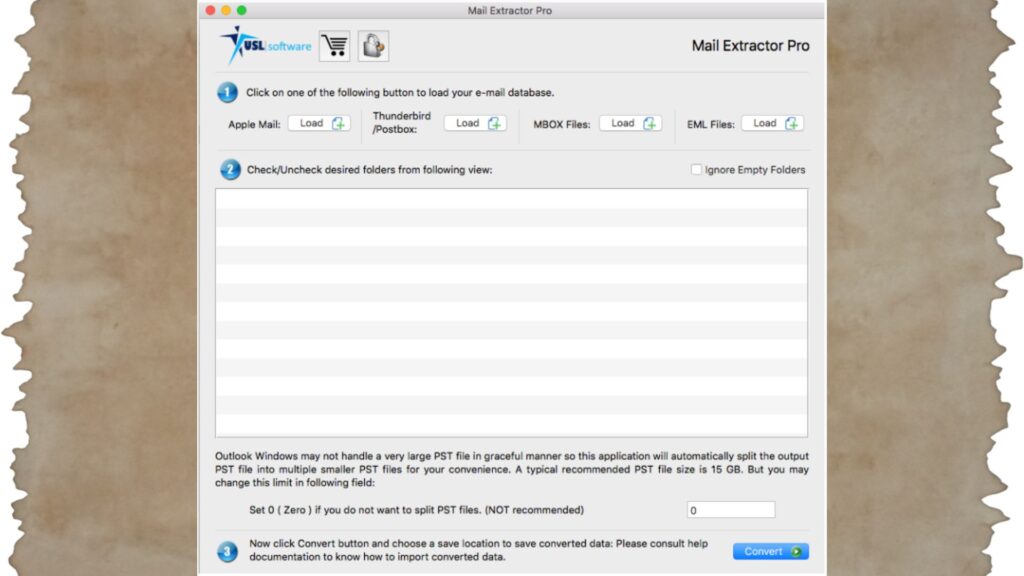
Mail Extractor Pro is a powerful Apple Mail MBOX to Outlook converter designed to simplify the entire email migration process for both technical and non-technical users. It supports seamless conversion of Apple Mail, Thunderbird, Postbox, and other MBOX-based email clients into Outlook-compatible PST files.
Why Choose Mail Extractor Pro?
- All-in-One Conversion Tool
Convert MBOX files from multiple email clients into PST format without needing any additional software. - Supports Mac and Windows Platforms
The tool is designed to work efficiently across different environments, making it ideal for users switching between operating systems. - Reliable and Accurate Performance
Built with advanced algorithms, it ensures complete data conversion without loss or modification. - User-Friendly Interface
Even users with minimal technical knowledge can easily perform conversions with a simple and intuitive interface. - Trusted by Professionals
Mail Extractor Pro has become a preferred choice for individuals and businesses looking for a secure and hassle-free migration solution.
By choosing Mail Extractor Pro, users can eliminate the complexities of manual methods and ensure a smooth, fast, and accurate conversion experience.
Key Features of Mail Extractor Pro
When it comes to Apple Mail MBOX to Outlook conversion, the effectiveness of the tool depends on its features. Mail Extractor Pro is equipped with powerful functionalities that ensure a smooth, accurate, and hassle-free migration experience.
1. High-Accuracy Conversion
Mail Extractor Pro is built with advanced algorithms that ensure every email is converted with precision. It preserves email content, formatting, and structure without any data loss.
2. Supports Unicode & ASCII Data
The tool efficiently handles both ASCII (text-based data) and Unicode (non-English characters, attachments, images) formats, ensuring complete and accurate conversion of all types of data.
3. Bulk Conversion Capability
With its bulk conversion feature, users can convert multiple MBOX files in a single operation. This significantly reduces time and effort, especially for large-scale migrations.
4. Maintains Folder Hierarchy
The software preserves the original folder structure during conversion, allowing users to access their emails in Outlook just as they were organized in Apple Mail.
5. Preserves Attachments and Metadata
All attachments, email properties (To, From, Subject, Date), and formatting are retained, ensuring data integrity throughout the process.
6. User-Friendly Interface
The intuitive design makes it easy for both beginners and professionals to perform conversions without technical complications.
7. Secure and Reliable Process
The tool ensures a safe conversion environment, preventing data corruption or loss during the migration process.
These features make Mail Extractor Pro a dependable Apple Mail MBOX to Outlook converter, helping users achieve fast, accurate, and stress-free email migration.
Step-by-Step Guide to Convert Apple Mail MBOX to Outlook
Follow these simple steps to perform Apple Mail MBOX to Outlook conversion using Mail Extractor Pro:
- Download & Install Mail Extractor Pro on your system
- Add MBOX Files from Apple Mail or Auto Load Apple Mail database
- Preview Emails to verify data before conversion
- Start Conversion with a single click
- Import PST into Outlook on Mac or Windows
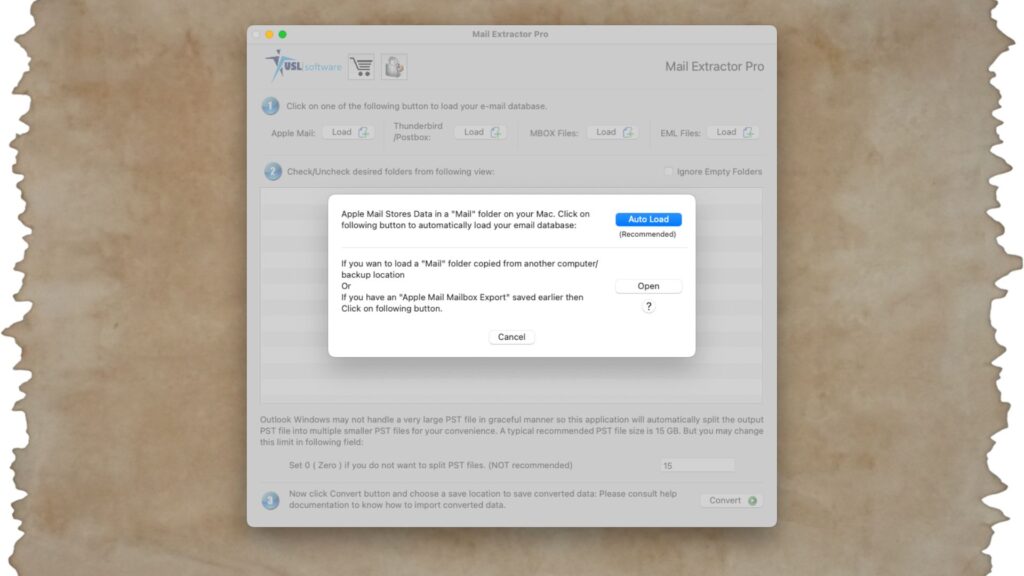
This quick process makes Mail Extractor Pro an efficient Apple Mail MBOX to Outlook PST converter, saving time while ensuring accurate results.
Benefits of Using Mail Extractor Pro
Choosing a professional solution for Apple Mail MBOX to Outlook conversion offers several advantages, and Mail Extractor Pro delivers on all fronts.
1. Saves Time and Effort
With its bulk conversion feature, you can convert multiple MBOX files at once—eliminating the need for repetitive manual work.
2. Ensures Complete Data Accuracy
The tool maintains 100% data integrity by preserving emails, attachments, formatting, and metadata throughout the conversion process.
3. No Technical Expertise Required
Its user-friendly interface makes it easy for anyone to perform conversions without needing advanced technical knowledge.
4. Secure and Reliable Conversion
Mail Extractor Pro ensures a safe migration environment, preventing data loss, corruption, or alteration.
5. Compatible with Mac and Windows
Whether you’re using macOS or Windows, the tool provides a seamless experience across platforms.
By using Mail Extractor Pro, users can simplify the entire Apple Mail MBOX to PST (Outlook) converter process and achieve fast, accurate, and stress-free email migration.
Tips for Successful Email Migration
To ensure a smooth Apple Mail MBOX to Outlook conversion, following a few best practices can make a big difference in the final outcome.
1. Backup Your Data
Always create a backup of your MBOX files before starting the conversion process to avoid any accidental data loss.
2. Organize MBOX Files
Keep your files well-structured and sorted to make the conversion process more efficient and manageable.
3. Check System Requirements
Ensure your system has enough storage space and meets the necessary requirements for running the Apple Mail MBOX to Outlook converter smoothly.
4. Avoid Interruptions During Conversion
Do not close the application or shut down your system while the conversion is in progress to prevent corruption.
5. Use a Reliable Tool
Always choose a trusted solution like Mail Extractor Pro to ensure accurate and secure migration without complications.
Following these tips will help you achieve a hassle-free and successful email conversion experience.
Conclusion
Apple Mail MBOX to Outlook conversion doesn’t have to be complicated when you choose the right approach. While manual methods may seem like an option, they often come with risks and limitations that can affect your valuable data.
Using a reliable Apple Mail MBOX to Outlook converter like Mail Extractor Pro ensures a smooth, accurate, and secure migration process. With its advanced features, user-friendly interface, and high conversion accuracy, it simplifies even the most complex email conversions.
Whether you are an individual user or a business professional, investing in the right tool can save time, reduce effort, and guarantee complete data integrity—making your transition from Apple Mail to Outlook seamless and stress-free.
Try It Today!
Ready to simplify your Apple Mail MBOX to Outlook conversion?
Get started today with Mail Extractor Pro—the reliable Apple Mail MBOX to Outlook converter designed for fast, accurate, and hassle-free email migration.
- Download the free trial and explore its features
- Experience bulk conversion with complete data accuracy
- Migrate your emails safely without technical complexity
Take the first step toward a smooth email transition—try Mail Extractor Pro now!