Gmail to Outlook Transfer Tool is the smartest solution for users looking to migrate their email data safely and efficiently. As more individuals and businesses shift to Microsoft Outlook for its advanced features and better workflow management, the need for a reliable migration method has become more important than ever.
While manual methods may appear to be a simple option, they often struggle to handle large volumes of emails, attachments, and complex data structures. This can lead to data loss, broken formatting, and incomplete transfers—making the process frustrating and unreliable.
With a professional solution in place, users can avoid these challenges entirely. A powerful Gmail to Outlook Transfer Tool ensures smooth, accurate, and secure migration of all your email data, allowing you to transition to Outlook without any hassle.
Why Manual Methods Are No Longer Reliable
Relying on manual techniques for email migration might have worked in the past, but today’s data complexity makes them far less effective. As email databases grow larger and more diverse, traditional approaches struggle to keep up with the demands of accurate and complete migration.
One of the biggest challenges with manual methods is their inability to handle bulk data efficiently. Migrating thousands of emails along with attachments, metadata, and folder structures can quickly become overwhelming. In many cases, users end up with missing emails, misplaced folders, or corrupted attachments.
Another major drawback is the lack of accuracy. Manual processes often fail to preserve the original formatting, timestamps, and properties of emails. This not only affects data integrity but can also create confusion when accessing emails in Outlook later.
Additionally, manual migration requires a certain level of technical expertise. For non-technical users, the process can be complicated, time-consuming, and prone to errors. Even a small mistake can result in partial or failed migration.
This is why switching to a reliable Gmail to Outlook Transfer Tool is no longer just an option—it’s a necessity for anyone looking to ensure a smooth, secure, and complete email migration experience.
What is a Gmail to Outlook Transfer Tool?
A Gmail to Outlook Transfer Tool is a specialized software designed to help users seamlessly migrate their email data from Gmail to Microsoft Outlook without complications. Instead of relying on complex manual steps, this tool automates the entire process, making email migration quick, accurate, and stress-free.
These tools are built to handle various email file formats such as MBOX (commonly used in Gmail backups via Google Takeout) and convert them into PST format, which is fully compatible with Outlook. This ensures that users can access their emails in Outlook just as they were in Gmail—without any loss of data or structure.
What makes a Gmail to Outlook Transfer Tool truly valuable is its ability to manage every aspect of the migration. From emails and attachments to contacts, calendar entries, and metadata, everything is transferred with precision. This eliminates the risk of missing or corrupted data during the process.
Additionally, these tools are designed with user convenience in mind. With intuitive interfaces, guided steps, and minimal technical requirements, even non-technical users can complete the migration with ease.
In today’s fast-paced digital environment, using a reliable Gmail to Outlook Transfer Tool is the most efficient way to ensure a smooth and secure transition between email platforms.
Key Features to Look for in a Gmail to Outlook Transfer Tool
Choosing the right Gmail to Outlook Transfer Tool is crucial for ensuring a smooth and successful email migration. Not all tools offer the same level of performance, so understanding the key features can help you make the best decision.
One of the most important features is complete data conversion. A reliable tool should migrate not only emails but also attachments, contacts, calendar entries, and metadata without leaving anything behind. This ensures a fully intact mailbox after the transfer.
Another essential feature is support for multiple file formats. Since Gmail data is often exported in MBOX format via Google Takeout, the tool should be capable of converting MBOX, EMLX, and similar formats into PST files compatible with Outlook.
Data integrity and preservation are equally important. The tool must maintain the original folder hierarchy, email formatting, timestamps, and properties so that your data appears exactly the same in Outlook as it did in Gmail.
Support for Unicode and non-English content is also a must-have. A good Gmail to Outlook Transfer Tool should accurately convert emails in different languages without any encoding issues.
Lastly, a user-friendly interface can make a huge difference. Features like step-by-step wizards, clear instructions, and minimal technical requirements ensure that even beginners can perform the migration without confusion.
By focusing on these features, you can select a Gmail to Outlook Transfer Tool that delivers both efficiency and reliability for your email migration needs.
Why Mail Extractor Pro is the Best Gmail to Outlook Transfer Tool
When it comes to choosing a reliable Gmail to Outlook Transfer Tool, USL Software’s Mail Extractor Pro stands out as a complete and powerful solution. Designed to handle complex email migration tasks with ease, the tool combines advanced functionality with a simple, user-friendly experience.
Mail Extractor Pro is built as an all-in-one conversion tool, allowing users to convert Gmail MBOX files, along with formats like EMLX and other email archives, directly into Outlook-compatible PST files. This eliminates the need for multiple tools and simplifies the entire migration process.
What truly sets it apart is its high level of accuracy and data integrity. The tool ensures that every email, attachment, and metadata element is converted without any loss or alteration. Even complex or previously unsupported data types are handled efficiently, making it a dependable choice for all kinds of users.
In addition to its performance, Mail Extractor Pro offers a clean and intuitive interface. With guided steps and clear instructions, users can complete their Gmail to Outlook migration without any technical difficulties. Whether you are a beginner or an experienced user, the tool makes the entire process smooth and hassle-free.
For anyone looking for a dependable and efficient Gmail to Outlook Transfer Tool, Mail Extractor Pro delivers the perfect balance of simplicity, accuracy, and performance.
Convert Everything Without Data Loss
One of the most critical aspects of any Gmail to Outlook Transfer Tool is its ability to perform complete and accurate data migration. When switching platforms, even the smallest piece of missing information can disrupt workflow and communication. That’s why having a tool that converts everything without data loss is essential.
A reliable solution like Mail Extractor Pro ensures that every element of your email data is transferred seamlessly. This includes emails, attachments, embedded files, contacts, and even calendar data. Nothing is skipped or left behind during the conversion process.
The tool also preserves the original structure and formatting of your emails. Folder hierarchy, timestamps, sender and recipient details, and email properties remain unchanged, allowing users to access their data in Outlook exactly as it appeared in Gmail.
Another major advantage is its ability to handle complex and non-English (Unicode) data. Many traditional tools fail to convert such content correctly, but a professional Gmail to Outlook Transfer Tool ensures accurate encoding and readability across all languages.
By maintaining data authenticity and completeness, the tool guarantees a secure and trustworthy migration experience—giving users complete confidence in their email transfer process.
User-Friendly Interface for Effortless Migration
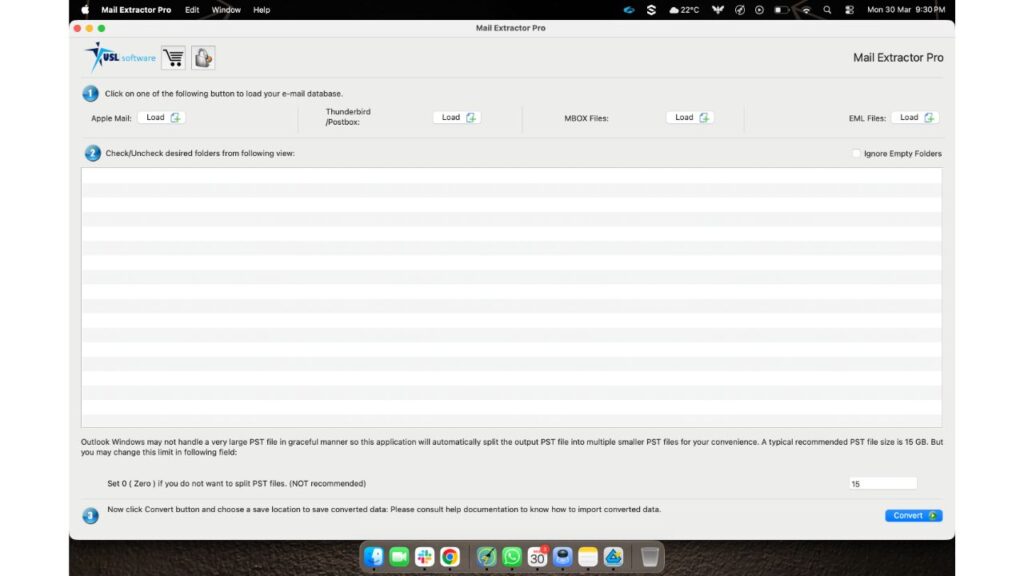
A powerful Gmail to Outlook Transfer Tool is only as good as its usability, and that’s where Mail Extractor Pro truly shines. Designed with simplicity in mind, the tool offers a clean and intuitive interface that makes email migration easy for everyone—regardless of technical expertise.
Unlike many complex tools, Mail Extractor Pro focuses on clarity and ease of navigation. It displays only the essential options required for the conversion process, helping users avoid confusion and complete tasks efficiently.
The tool also includes step-by-step wizards and informative dialog boxes that guide users throughout the migration journey. From selecting files to completing the conversion, every stage is clearly explained, reducing the chances of errors.
This user-centric design ensures that even first-time users can perform Gmail to Outlook migration without any hassle. At the same time, professionals benefit from the tool’s smooth workflow and time-saving features.
With such a thoughtfully designed interface, Mail Extractor Pro transforms what could be a complicated process into a simple and pleasant experience—making it an ideal Gmail to Outlook Transfer Tool for all users.
Benefits of Using a Professional Gmail to Outlook Transfer Tool
Using a professional Gmail to Outlook Transfer Tool offers significant advantages over traditional methods, especially when dealing with large and complex email data. These tools are designed to simplify the entire migration process while ensuring accuracy, security, and efficiency.
One of the biggest benefits is time-saving automation. Instead of manually handling emails one by one, the tool performs bulk conversion in just a few clicks, allowing users to complete the migration process much faster.
Another key advantage is data safety and accuracy. A professional tool ensures that all emails, attachments, and metadata are transferred without any loss or corruption. This level of precision is difficult to achieve with manual methods.
These tools also provide secure migration, protecting sensitive email data throughout the process. Users can confidently transfer their information without worrying about data breaches or inconsistencies.
Additionally, a reliable Gmail to Outlook Transfer Tool is highly scalable, meaning it can handle both small and large email databases with equal efficiency. Whether you’re an individual user or a business, the tool adapts to your needs.
Overall, using a professional solution not only simplifies migration but also enhances productivity by eliminating errors, saving time, and ensuring a smooth transition to Outlook.
Step-by-Step Overview of the Conversion Process
Using a Gmail to Outlook Transfer Tool like Mail Extractor Pro makes the entire migration process simple and structured. Even users with minimal technical knowledge can complete the conversion by following a few easy steps.
First, install and launch the tool on your system. The intuitive interface ensures that you can quickly get started without any confusion.
Next, upload your Gmail data file, typically downloaded via Google Takeout in MBOX format. The tool supports multiple file types, allowing flexibility in selecting your input data.
After that, click on “Convert”. The output will be PST, which is fully compatible with Microsoft Outlook. This step ensures that your converted data can be accessed seamlessly in Outlook.
Once everything is set, start the conversion process. The tool will automatically process your data, converting emails, attachments, and other elements while maintaining their original structure.
Finally, preview and save the converted data to your desired location. You can then import the PST file into Outlook and access your emails without any issues.
With such a straightforward process, a Gmail to Outlook Transfer Tool eliminates complexity and ensures a smooth, error-free migration experience.
Try Mail Extractor Pro Today
If you’re looking for a reliable and efficient Gmail to Outlook Transfer Tool, now is the perfect time to experience the capabilities of Mail Extractor Pro. Designed to simplify complex email migrations, the tool offers everything you need for a smooth and secure transition.
With its powerful features, high accuracy, and user-friendly interface, Mail Extractor Pro ensures that your entire email database is converted without any hassle. Whether you’re handling personal emails or large business data, the tool adapts to your needs effortlessly.
To help users get started, USL Software offers a free trial version of Mail Extractor Pro. This allows you to explore its features, understand its functionality, and see the results firsthand before making a decision.
Don’t let complicated methods slow you down. Choose a trusted Gmail to Outlook Transfer Tool and take control of your email migration process with confidence.
Conclusion
Choosing the right Gmail to Outlook Transfer Tool is essential for ensuring a smooth, secure, and accurate email migration. With increasing data complexity, relying on outdated manual methods is no longer practical or reliable.
A professional solution like Mail Extractor Pro simplifies the entire process by offering complete data conversion, preserving original structure, and providing an easy-to-use interface. From emails and attachments to calendars and metadata, everything is transferred with precision and care.
By investing in a trusted Gmail to Outlook Transfer Tool, you not only save time and effort but also eliminate the risks associated with data loss and errors. Make the smart move today and experience a hassle-free transition from Gmail to Outlook with confidence.